Brother Waste Ink Pads: B2B Buyer's Guide to Failure, Inspection, and Sourcing
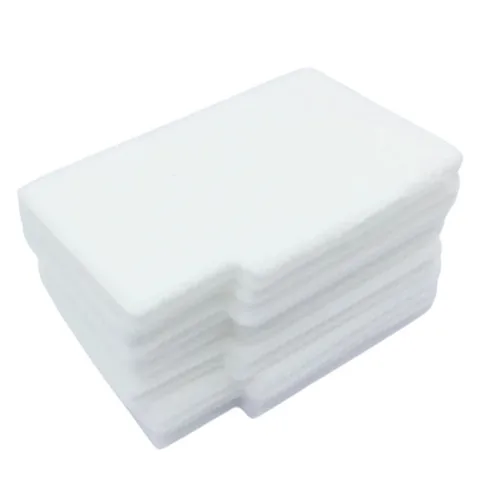
Waste ink pad saturation is one of the most frequent service calls on Brother inkjet and ink tank machines. For importers and repair shops, the real cost isn't the pad itself—it's the labor, shipping, and reputational hit when a cheap replacement fails early. This guide breaks down what actually goes wrong, how to spot a quality pad before you stock it, and what to demand from your supplier.
Why Brother Waste Ink Pads Fail
Brother's waste ink system is simple but unforgiving. Every head clean, power flush, and borderless print dumps ink into an absorbent pad. The pad is sized for a certain number of cycles, but real-world usage varies wildly. A machine used for daily photo printing will saturate its pad far faster than one printing the occasional document. The failure mode is almost always the same: the pad reaches capacity, ink overflows or backs up, and you get ink smears on prints, error codes like "Ink Absorber Full," or ink leaking from the bottom of the chassis.
What many buyers miss is that the pad material itself matters. Low-quality pads use loosely packed felt or foam that compresses unevenly. Ink pools in one area while the rest stays dry, triggering early saturation errors. Genuine Brother pads use a dense, multi-layer felt that wicks ink evenly. Aftermarket pads that skimp on density will fail months ahead of schedule—often just after your customer's warranty period ends, which is the worst time for a comeback.
Inspection Points for Incoming Waste Ink Pads
You can't test a pad's full life cycle without installing it, but you can catch obvious defects before they reach your bench. Start with a visual check: the pad should be uniform in thickness and color, with no visible gaps or hard spots. Squeeze it gently—it should feel firm but resilient, not crumbly or overly soft. A pad that stays compressed after you release it will channel ink and saturate prematurely.
Next, check the fit. Brother waste ink pads are model-specific, and even a millimeter of misalignment can cause ink to bypass the pad and drip onto the paper feed path. Drop the pad into a known-good housing from a scrap machine. It should sit flush with no rocking. Also inspect the sealing edges—any fraying or loose fibers will wick ink where it shouldn't go. Finally, verify the part number against Brother's service manual for the exact model. Cross-compatibility charts from unknown sources are a common source of wrong-part orders.
- Uniform thickness and density—no hard spots or gaps.
- Resilient, not crumbly—pad should spring back after compression.
- Precise fit in housing—no rocking or gaps at edges.
- Clean, sealed edges—no loose fibers or fraying.
- Correct part number for the specific model—not a generic "fits many" claim.
Selection Criteria: What Separates Good Pads from Bad
When you're sourcing waste ink pads, the spec sheet only tells you so much. Ask about the felt's density and ink absorption rate. A quality pad should hold at least 80% of its weight in ink without dripping. Cheaper pads often use recycled felt with inconsistent fiber length, which leads to uneven absorption and early overflow. If your supplier can't provide an absorption test report, that's a red flag.
Another factor is ink resistance. Brother's pigment and dye inks vary in viscosity, and a pad that works fine with one may degrade faster with another. Look for pads that are tested with the specific ink type your market uses. For the European market, where refill inks are common, pads must resist swelling from solvent content. In Asia, high-humidity environments demand pads that don't absorb moisture from the air and lose capacity.
Packaging also matters. Pads shipped loose in a bag can pick up dust and oils that reduce absorption. A supplier that vacuum-packs or uses clean-room bagging is serious about quality. Check for a desiccant pack—moisture during shipping can cause mold growth on felt, which will clog the printhead over time.
Installation and Reset Best Practices
Even the best pad fails if installed wrong. The most common mistake is not resetting the waste ink counter. Brother machines track ink usage in firmware; if you replace the pad but don't reset the counter, the machine will still throw an error. Use the correct service tool or manual reset procedure for the model. Also, clean the waste ink tube and the printhead parking station before installing a new pad. Residual ink in the tube will harden and block the new pad's intake, causing overflow within weeks.
After installation, run a head cleaning cycle and check for leaks. A small leak now is a big problem later. Advise your customers to keep the machine level and avoid moving it immediately after a pad change—ink needs time to settle. For high-volume users, consider installing a waste ink tank mod if available, but only if it's designed for the specific model. Generic mods often void warranties and cause more harm than good.
CLONER's Factory-Direct Advantage for Brother Waste Ink Pads
CLONER manufactures waste ink pads for Brother models in our own facility, which means we control the felt density, die-cutting tolerance, and clean-room packaging. We don't source from third-party traders, so you get consistent quality batch after batch. For OEM/ODM buyers, we can customize pad dimensions, absorption rates, and packaging to match your brand's requirements—including model-specific part numbers and multilingual labels.
Because we ship factory-direct, you avoid middleman markups and get full traceability on materials. We provide absorption test reports and can supply samples for your bench testing before you commit to volume. Whether you're stocking for a repair network or private-labeling for your distributors, our team can help you select the right pad for each Brother model family and avoid the costly comebacks that come from cheap substitutes. Reach out with your model list and we'll match it to our current tooling.
Need a quote or samples from CLONER?
Factory-direct OEM/ODM supplier of compatible printer consumables & spare parts. Tell us your models — reply within 24h.