Buying Drum Unit for Brother: A Field Guide for Copier Repair Shops
If you repair Brother machines for a living, you already know the drum unit is the heart of the print engine. But when you're buying them by the case for resale or installation, a wrong pick or a subpar batch can eat your margin and your reputation. This guide walks through the real-world decisions: which drum fits which Brother model, how to inspect what lands on your dock, and what to demand from your supplier.
Know Your Brother Drum Families
Brother uses a handful of drum unit families across its laser lineup. The DR-630 and DR-640 series cover the older HL-2240/2270 and MFC-7360/7460 machines. The DR-730 and DR-731 serve the newer HL-2340/2380 and MFC-L2700/L2740. Then you have the DR-820/830 for the business-grade HL-5450/6180 and MFC-L5700/L6800 lines. Each family has a specific page yield and a distinct electrical contact pattern.
Mixing them up is the most common mistake we see. A DR-630 looks similar to a DR-730 at a glance, but the chip and the drum gear ratio differ. Installing the wrong one triggers a 'Drum Error' or just produces faded prints from day one. Always cross-check the exact model number against the Brother compatibility chart—don't rely on the machine's name alone, because the same MFC model can ship with different drum units depending on the region.
Inspect Before You Stock
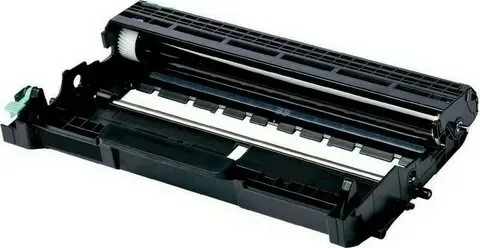
When a batch of drum units arrives, do a quick visual and mechanical check before you put them on the shelf. Look at the drum surface: it should be a uniform dark green or blue with no scratches, fingerprints, or bright spots. A bright spot means the OPC layer is damaged, and that drum will produce a repeating defect on every page. Check the wiper blade edge for any nicks or tears—a damaged blade causes streaking that no toner can fix.
Rotate the drum gear by hand. It should turn smoothly with a slight resistance, and the charge roller (the black foam roller inside) should spin freely. If you feel any grinding or see the gear teeth chipped, reject the unit. Also inspect the chip connector pins—they should be straight and clean. Bent pins are a common issue in cheap aftermarket units and will cause the machine to throw a 'Drum Unit Error' immediately.
- Drum surface: no scratches, fingerprints, or bright spots.
- Wiper blade: intact, no nicks or tears.
- Gear rotation: smooth, no grinding.
- Chip pins: straight and clean.
Buying New vs. Remanufactured
For repair shops, the new-vs-reman decision is about risk tolerance. New drum units—whether OEM or compatible—give you predictable yield and fewer callbacks. Remanufactured units are cheaper but carry higher variability. We've tested many reman drums from various suppliers, and the failure rate can be 5–10% out of the box, mostly due to reused OPC drums that are near end-of-life.
If you go reman, ask your supplier for the OPC drum's surface condition and the number of cycles it has already run. A reputable remanufacturer will only use drums with less than 30% wear and will replace the wiper blade and charge roller. But even then, you're taking a gamble. For high-volume B2B accounts, new compatible drums are the sweet spot: they cost less than OEM but deliver consistent output. At CLONER, we manufacture new drums from raw materials—we don't remanufacture—so you get a fresh OPC and a full-life blade every time.
Key Specifications to Verify
Beyond fit, check the drum's rated yield. Brother's OEM drums are rated for 12,000 to 25,000 pages, depending on the family. A compatible drum that claims a higher yield than the OEM spec is usually lying—or it's using a thinner OPC layer that will wear out faster in real-world conditions. Stick to the OEM yield rating or slightly above.
Also verify the drum's electrical and mechanical specs: the charging voltage, the drum diameter, and the gear pitch. These aren't published in most catalogs, but your supplier should know them. If they can't answer basic questions about the OPC thickness or the charge roller hardness, that's a red flag. We supply full spec sheets for every CLONER drum unit, including the OPC thickness (typically 20–30 microns) and the exact gear module.
Working with a Factory-Direct Partner
When you buy from a factory-direct manufacturer like CLONER, you cut out the middleman and gain control over quality. You can request pre-shipment inspection samples, ask for batch-specific test reports, and even customize the chip programming for your market—some regions use a different chip protocol that locks out generic drums. As an OEM/ODM supplier, we can produce drum units under your brand, with your packaging, and with the exact chip settings your customers need.
That's the practical advantage: you're not just buying a part, you're building a supply chain that protects your margin. Whether you need a container of DR-630s or a custom run for a new Brother model, we'll match the spec, test it, and ship it with the paperwork that keeps your clients happy. Ask for a sample batch and compare it against the OEM—you'll see the difference in the first hundred prints.
Need a quote or samples from CLONER?
Factory-direct OEM/ODM supplier of compatible printer consumables & spare parts. Tell us your models — reply within 24h.