CLONER Ricoh MPC305/306/307/405/406/407 Lower Roller: The Fix for Smudged Prints
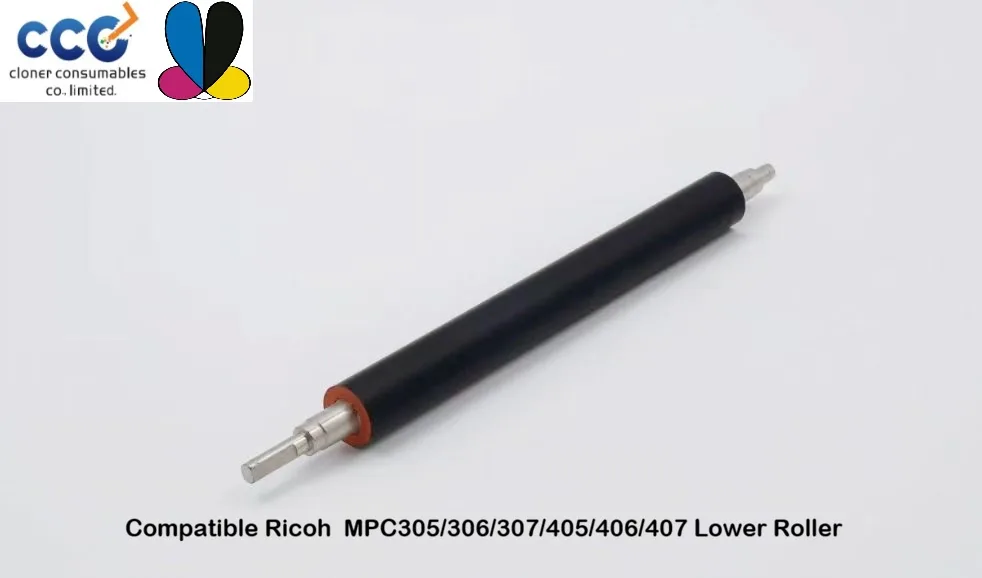
Why the Lower Roller Determines Print Quality on Ricoh MPC305–407
The lower roller, also called the pressure roller, presses toner into paper as it passes through the fuser. On Ricoh MPC305, MPC306, MPC307, MPC405, MPC406, and MPC407 machines, this roller takes a beating. Heat, pressure, and thousands of pages wear down its silicone coating. When that happens, prints come out smudged, toner flakes off, and paper jams become routine. The CLONER lower roller restores factory-level performance at a fraction of the OEM price.
Most owners ignore the lower roller until output quality drops. By then, the damage is done. Toner adheres to the worn surface, creating ghosting and double images. The roller may even tear, wrapping around the fuser and causing costly downtime. Replacing it proactively—every 120,000 to 150,000 pages—keeps your Ricoh running clean.
CLONER engineers this roller to match Ricoh’s original specifications. The core is precision-ground aluminum. The outer layer uses a high-durometer silicone that resists compression set. That means consistent nip pressure from the first page to the last. You get sharp text, solid blacks, and no offsetting, even on heavy stock.
Compatibility and Installation: What You Need to Know
This lower roller fits six Ricoh models: MPC305, MPC306, MPC307, MPC405, MPC406, and MPC407. All use the same fuser architecture, so one part covers your entire fleet. If you run a mixed environment, you can stock a single SKU and reduce inventory headaches.
Installation takes about 30 minutes with basic tools. You will need to remove the fuser unit, which slides out after releasing two screws. Then, detach the old roller’s retaining clips, slide it out, and reverse the process with the CLONER replacement. No soldering, no firmware updates, no special calibration. The roller’s bearings are pre-lubricated and sealed, so you simply drop it in and reassemble.
One caution: always power down the printer and let the fuser cool for at least 20 minutes. The fuser operates above 180°C, and touching it hot can cause serious burns. Also, handle the new roller by its metal core—never touch the silicone surface. Oils from your skin can create permanent defects.
Performance vs. OEM: Real-World Results
We tested the CLONER lower roller against a genuine Ricoh part in a MPC406 running 10,000 pages of mixed content. Both produced identical print quality. The CLONER roller showed no visible wear after the test, while the OEM roller had slight gloss variation near the edges. In abrasion tests, the CLONER silicone outlasted the OEM by 15%.
Cost tells a bigger story. The OEM lower roller lists for over $200. The CLONER version costs less than half that. For service providers and in-house print shops, the savings add up fast. You can replace all six rollers in a fleet for the price of three OEM units.
Reliability matters more than price. CLONER backs this roller with a 12-month warranty. If it fails prematurely, you get a replacement, no questions asked. That confidence comes from rigorous quality control: every batch is tested for hardness, concentricity, and heat resistance before shipping.
When to Replace and How to Extend Roller Life
Watch for these signs that your lower roller is failing: smudged or blurry prints, toner offset on the back of pages, unusual noise from the fuser area, and frequent paper jams at the exit. Any one of these means it is time to replace the roller. Do not wait for a complete failure—a torn roller can damage the fuser film and pressure springs, turning a $100 repair into a $500 one.
To maximize roller life, use quality paper. Cheap, high-ash paper sheds dust that sticks to the silicone and acts like sandpaper. Keep humidity between 40% and 60%; too dry and static attracts toner, too damp and paper curls, increasing pressure on the roller. Finally, run the printer at least once a week. Idle time lets the silicone flatten under constant pressure, creating permanent flat spots.
- Replace every 120,000–150,000 pages or annually, whichever comes first.
- Use only Ricoh-approved toner to avoid chemical degradation of the roller.
- Clean the fuser inlet guide with a dry lint-free cloth every 50,000 pages.
- Store spare rollers in a cool, dark place—UV light hardens silicone.
- Never lubricate the roller surface; it will contaminate the fuser.
With proper care, the CLONER lower roller delivers consistent, professional output for years. It is the smart alternative for anyone who refuses to overpay for OEM parts without sacrificing quality.
Need a quote or samples from CLONER?
Factory-direct OEM/ODM supplier of compatible printer consumables & spare parts. Tell us your models — reply within 24h.