Common PCR Failures on Kyocera Machines and How to Avoid Them
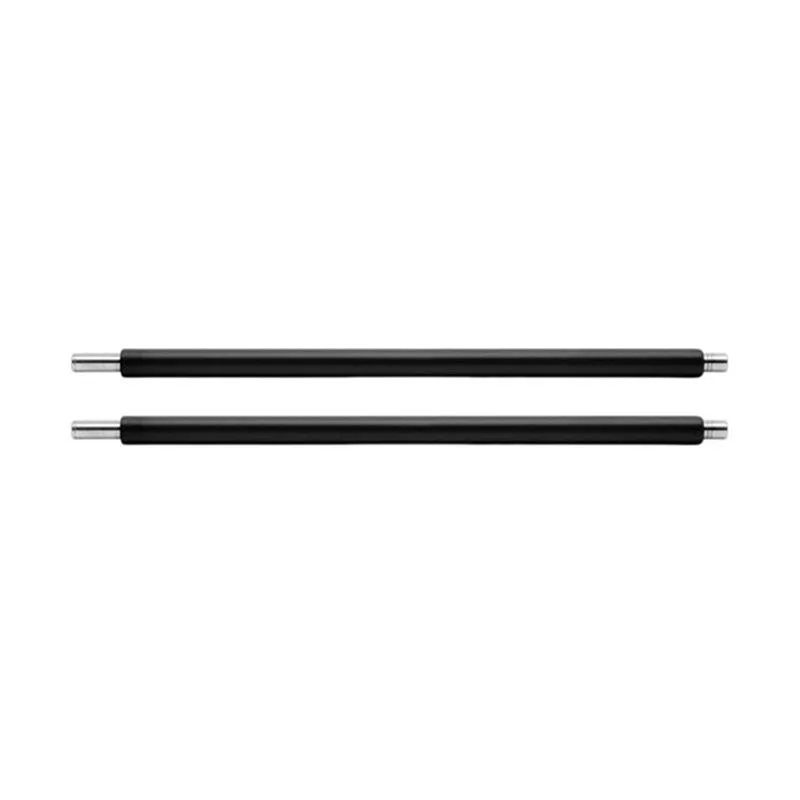
Kyocera's reputation for long-life consumables is well-earned, but that doesn't make their machines immune to premature PCR failure. In our experience supplying thousands of PCRs to repair shops and distributors, the same failure patterns show up again and again—and most trace back to buying decisions, not the machine itself. If you're sourcing PCRs for Kyocera TASKalfa or ECOSYS series, knowing what goes wrong is the difference between a satisfied customer and a return.
Why Kyocera PCRs Fail: The Big Three
The primary charge roller does one job: apply a uniform negative charge to the drum surface. When it fails, you see ghosting, background scatter, or a repetitive print defect every 26–30mm depending on the drum diameter. On Kyocera machines, three failure modes dominate. First, contamination from toner additives or paper dust builds a resistive layer on the PCR surface, causing uneven charging and light streaks. Second, ozone and nitrogen oxides from the corona discharge degrade the conductive coating, leading to charge leakage and dark background. Third, mechanical wear—flattening or cracking of the roller—creates pressure marks and poor nip contact.
What many buyers miss is that these failures are accelerated by the wrong PCR specification. A PCR designed for a 30ppm machine won't survive in a 50ppm TASKalfa. The rubber hardness, diameter tolerance, and coating formulation must match the machine's charge voltage and speed. Cheap PCRs often skimp on the conductive additive, which works fine for a few thousand pages then fails catastrophically.
Inspection Checklist Before You Install
Before a PCR goes into a Kyocera, inspect it like you're troubleshooting a comebacker. Here's what we recommend checking on every batch:
- Surface uniformity: no visible seams, bubbles, or dull patches under a bright light.
- Diameter consistency: measure at three points; variance over 0.05mm will cause banding.
- End seals: the felt or foam seals must be intact and correctly seated to prevent toner intrusion.
- Shaft straightness: roll the PCR on a flat surface; any wobble means poor charge contact.
- Resistance reading: use a megohmmeter to confirm the roller falls within the OEM-specified range.
These checks take less than a minute per roller and catch 90% of defects before they reach the customer. If you're buying in bulk, ask your supplier for batch test data—CLONER provides resistance and dimensional reports with every OEM/ODM order.
Installation Mistakes That Kill PCR Life
Even a perfect PCR fails fast if installed wrong. The most common error is touching the roller surface with bare hands. Skin oils are conductive and create permanent charge defects. Always handle by the shaft or wear nitrile gloves. Another frequent mistake is over-tightening the PCR mounting screws—this bows the shaft and causes uneven pressure against the drum. On Kyocera FS-4100 and similar models, the PCR sits in a spring-loaded holder; if the springs are worn or missing, the roller won't make proper contact.
Also pay attention to the cleaning blade and drum. A worn drum with a rough surface will chew through a PCR in half the normal life. If you're replacing the PCR, inspect the drum and blade at the same time. In high-volume TASKalfa 3550ci machines, we've seen PCRs fail at 80k pages because the drum had deep scratches that acted like sandpaper.
Selecting the Right PCR: Insider Buying Guide
Not all PCRs are created equal. The OEM part number for a Kyocera TASKalfa 3050ci PCR is 302F930010, but aftermarket equivalents vary wildly. Look for rollers with a dual-layer construction: a conductive core and a resistive outer coating. This design stabilizes charge across humidity swings—critical for machines in coastal or desert environments. Ask your supplier for the roller's hardness rating (typically 60–70 Shore A) and volume resistivity (10^6 to 10^8 ohm-cm).
Another insider tip: match the PCR to the toner. Some third-party toners use abrasive additives that wear PCRs faster. If you're selling a full consumables kit, test the PCR with the toner you stock. CLONER's OEM/ODM service lets you specify the coating formulation and even private-label the roller for your brand. We've helped distributors in Europe and Southeast Asia develop PCRs that outperform the OEM in high-dust environments by adjusting the surface roughness.
Preventing Repeat Failures: Maintenance and Storage
PCRs have a shelf life. Store them in a cool, dark place—UV light and heat degrade the conductive coating. If you're a distributor holding stock for months, rotate inventory and keep them in sealed bags with desiccant. On the machine side, advise your customers to run the drum refresh cycle if available. Kyocera's ECOSYS series has a cleaning mode that can extend PCR life by removing light contamination.
Finally, track failures by serial number. If you see a pattern—say, PCRs failing at 50k pages on a specific machine model—it's likely a specification mismatch. Work with your supplier to adjust the roller's resistance or hardness. CLONER's factory-direct model means we can produce custom batches with your exact specs, no minimum order quantity games. Whether you need 500 or 50,000 PCRs, you get the same engineering support and batch consistency.
Need a quote or samples from CLONER?
Factory-direct OEM/ODM supplier of compatible printer consumables & spare parts. Tell us your models — reply within 24h.