Buying OKI Copier Boards: A Repair Shop's Field Guide
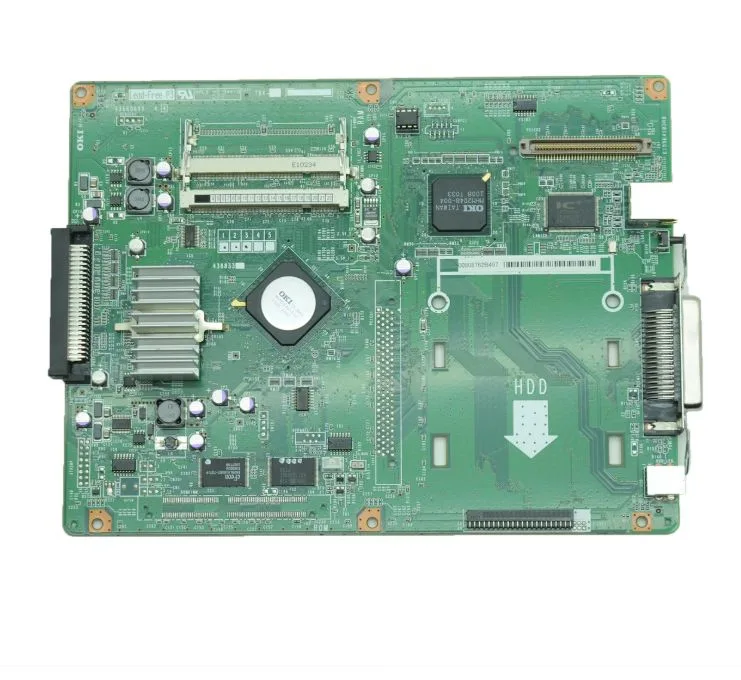
A dead OKI C332 on the bench with a blank display is a parts-sourcing problem before it's a repair problem. Most shops lose margin on OKI boards not because they can't fit them, but because they ordered the wrong revision, got a pulled unit with a blown fuse, or paid distributor pricing on a part that ships direct from the factory floor. This guide is about buying the board right the first time.
Know which board you're actually buying
OKI machines carry several distinct boards that shops lump together as "the main board." On the C300/C500 series you're usually after the engine controller or the main controller PCB; on MC332/MC342 the combined controller and the high-voltage power supply board fail separately and get misdiagnosed as each other. The C800/C810 and MC800 series add a separate image processor board, and on the Pro9431/9541 the formatter is its own assembly. Order by the OKI part number printed on the board silkscreen, not by the model name alone — the same chassis can carry two or three revisions.
Revision matters more than most buyers expect. OKI quietly changed regulator and capacitor specs mid-production on several C500-series boards, and a rev A board in a rev C machine will sometimes boot and sometimes throw a fuser error that sends your tech chasing the wrong part. Ask the supplier to confirm the revision letter and, where relevant, the firmware family the board ships with. A board that needs a firmware downgrade before it talks to the customer's machine is a board you'll be reworking for free.
What fails, and what that tells you about stock quality
On OKI power supply boards the usual killers are the primary switching FETs, the startup electrolytics, and the optocouplers in the feedback loop — heat and age, not abuse. Controller boards tend to die at the SDRAM solder joints, the USB controller, and the network interface after power events. If a supplier can't tell you which components they test, they aren't testing.
Pulled boards are the real hazard. A board pulled from a scrap machine may have been the reason the machine was scrapped. Look for reflow marks around the FETs, bulged or re-sleeved caps, and flux residue that wasn't there from the factory. Reballed BGA chips are common on cheap OKI controllers and fail within weeks under a print-shop duty cycle.
Inspection points before you accept a lot
Do a bench check on a sample from every lot, not just the first order. Power the board in a known-good chassis and run a full boot, a print, and a network ping if it's a networked model. Then check the physical tells. A board that passes boot but drops the network after ten minutes is worse than a dead one, because it ships to the customer and comes back.
- Silkscreen part number and revision letter match the order — photograph every unit
- No reflow halos, no re-sleeved capacitors, no flux residue on factory-clean boards
- Connectors undamaged, no bent pins, no cracked solder at the harness headers
- Firmware version readable and consistent across the lot
- Anti-static bag, desiccant, and a traceable lot label — no loose boards in a bubble envelope
Ask for the test report per lot. A serious supplier will have boot-tested and print-tested each unit and can tell you the pass rate. If the answer is "we check them," walk.
Ordering terms that protect your margin
OKI board demand is spiky. One shop might need five C332 controllers in a month and nothing for a quarter. Buy in small lots against a real failure history rather than loading up on a model that's already leaving the field. Insist on a DOA window of at least 90 days and a replacement-not-repair policy — you don't want to be shipping boards back and forth across an ocean while a customer waits.
Watch the mixed-lot pricing trap. Suppliers bundle slow-moving OKI formatter boards with fast-moving power supplies to move dead stock. Price the fast movers on their own and refuse the bundle unless the slow movers are genuinely on your shelf list. Also confirm the boards ship with the correct region firmware; an OKI board flashed for another market can throw language and modem errors that look like hardware faults.
Where factory-direct changes the math
CLONER builds OKI-compatible controller and power supply boards in-house, which means we can quote against the part number and revision you actually need instead of whatever a distributor has on the shelf. For repair chains and importers moving volume, that's OEM/ODM territory: your own labeling, your firmware spec, your packaging, and a lot traceability scheme that matches how you stock. Small shops get the same boards without the distributor markup.
Send us the silkscreen number and the failure symptom. We'll tell you whether it's a board we build, what revision it maps to, and what the test protocol looks like before it leaves the line. That's a faster conversation than guessing at a marketplace listing.