Buying Cleaning Blade for Sharp: A Field Guide for Copier Repair Shops
If you run a copier repair shop, you know the cleaning blade is the unsung hero of every Sharp print engine. It scrapes residual toner off the drum, and when it fails, you get those dreaded ghost images, background toner, or lines on the page. But not all Sharp cleaning blades are created equal. The aftermarket is full of blades that look right but wear out in 20,000 prints, or worse, damage the OPC drum. Here's what you need to know before you stock your shelves.
Know Your Sharp Blade Families
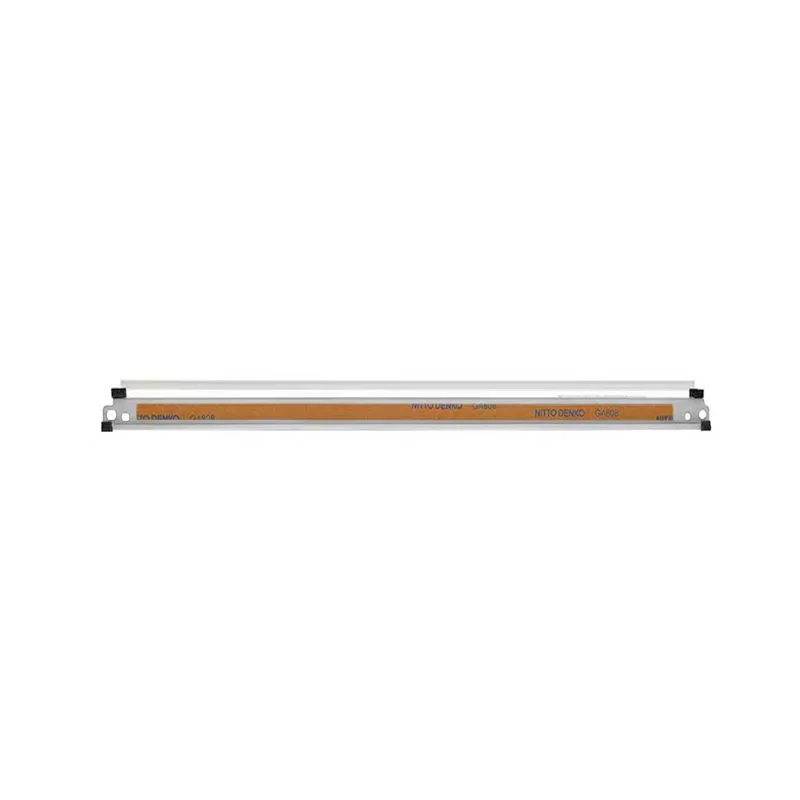
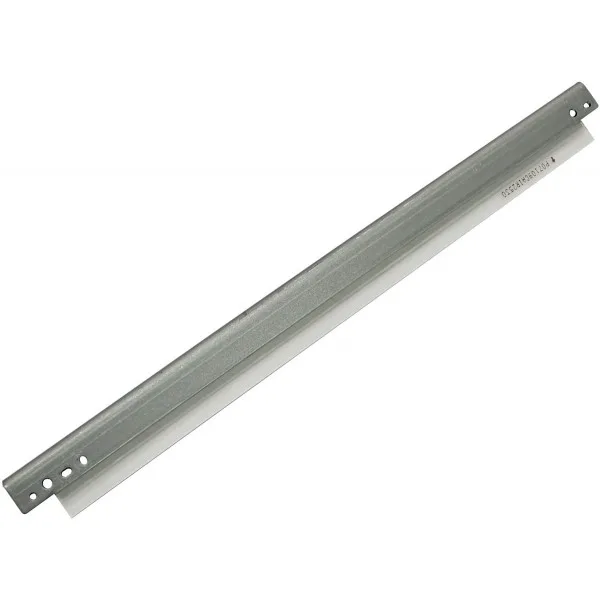
Sharp uses a few distinct blade types across their product lines. The older SF/AR series (like AR-200, AR-205, AR-230) typically use a straight blade with a metal holder, while the newer MX series (MX-2600, MX-3100, MX-4100, MX-5001) often have a curved blade with a plastic or metal frame. The material is usually polyurethane, but hardness and thickness vary. For instance, the MX-2600 blade is about 1.5mm thick with a hardness of 70 Shore A, while some high-volume models use a softer 65 Shore A to reduce drum wear. If you order a blade for an MX-4100 and get one meant for an MX-2600, it'll fit physically but could cause premature drum failure. Always check the part number, not just the model name.
Another critical distinction is the edge profile. Sharp blades have a sharp, square edge that contacts the drum at a precise angle. Some aftermarket blades have a slightly rounded edge due to poor molding, which reduces cleaning efficiency. You can test this by running your fingernail along the edge – it should feel sharp, not smooth. If it feels rounded, send it back. That's a basic QC check we do at CLONER on every batch.
Signs of a Failing Cleaning Blade
Your customers will come to you with specific symptoms. The most common is a faint, repeating mark on the page that matches the drum circumference. That's a blade nicked or worn in one spot. Another is toner fogging – a light gray haze over the entire page, especially in solid areas. That means the blade isn't wiping the drum clean, leaving a toner film that transfers to the paper. You might also see vertical black lines, which indicate the blade has a small tear or the edge has chipped. If you see any of these, replace the blade first, before suspecting the drum or developer. It's a cheap fix that saves your customer a costly drum replacement.
But here's the insider bit: sometimes the blade is fine, but the pressure spring or the blade holder is deformed. When you install a new blade, always check the holder for bends. A bent holder will cause uneven pressure, leading to streaks. At CLONER, we supply the blade and holder as an assembly for most Sharp models, which eliminates this variable. For shops that prefer to swap just the rubber blade, make sure you have a torque driver to set the mounting screws to spec – over-tightening distorts the blade edge.
Inspection Criteria When You Receive Blades
When you get a shipment of Sharp cleaning blades, don't just count boxes. Open a few and inspect them. First, check the rubber surface for any visible defects like bubbles, pits, or scratches. Use a magnifying glass if you have one. Second, flex the blade gently – it should return to its original shape without any crease marks. Third, measure the thickness with a caliper. A variance of more than 0.1mm from spec is a red flag. Fourth, look at the mounting holes – they should be clean, with no burrs that could strip screws. Finally, check the edge straightness by placing the blade on a flat surface and seeing if light passes under the edge. Any gap means a warp that will cause uneven cleaning.
These checks take two minutes and can save you from a field failure that costs you a service call and a customer. At CLONER, we run these same checks on every production line, but we still recommend our buyers do a random sample inspection on arrival. It's a good habit, and it protects your reputation.
Selecting a Supplier: Factory-Direct vs. Middlemen
You have options when buying Sharp cleaning blades: OEM (expensive but guaranteed), generic from a distributor (cheap but inconsistent), or factory-direct from a manufacturer like CLONER. The factory-direct route gives you the best balance of price and quality, provided the factory has experience with Sharp's specs. Ask your supplier for their quality control process – do they test blade hardness and edge sharpness on a sample basis? Do they have a spec sheet for each Sharp model? Can they provide a certificate of analysis for a batch? A reputable manufacturer will have all of that.
Another advantage of factory-direct is customization. If you have a high-volume customer who runs a specific Sharp model, you might want a blade with a different hardness or thickness to extend drum life. At CLONER, we offer OEM-ODM services, so we can adjust the polyurethane formula or the holder design to your exact requirements. That's something a middleman can't do. And because we're the factory, we control the lead time – typically 15-25 days for standard orders, and we can ship samples for testing before you commit to a bulk order.
Ordering Smart: Quantities and Terms
When you order cleaning blades, think about your inventory turnover. Sharp blades have a shelf life – polyurethane degrades over time, especially in hot, humid conditions. Don't buy a year's supply unless you have the storage space in an air-conditioned room. A good rule is to keep a two-month buffer. Also, consider ordering a mixed assortment of the top 5 Sharp models you service. That way, you're not stuck with a hundred blades for a model that's being phased out. At CLONER, we allow mixed SKU orders with no minimum per model, as long as the total quantity is reasonable.
Payment terms for factory-direct orders are typically T/T or L/C for larger amounts. If you're a new customer, we'll start with a sample order – 50 to 100 pieces – to evaluate quality. Once you're satisfied, we can move to a monthly or quarterly contract with better pricing. And we always provide a part number cross-reference list, so you can match our SKUs to Sharp's original numbers without guesswork.
In the end, buying cleaning blades for Sharp doesn't have to be a gamble. Know the part families, inspect what you receive, and choose a supplier that can back up their specs with factory-level quality control. CLONER has been making these blades for over a decade, and we're happy to send you a sample kit for the Sharp models you service. Just reach out with your part numbers, and we'll take it from there.
Need a quote or samples from CLONER?
Factory-direct OEM/ODM supplier of compatible printer consumables & spare parts. Tell us your models — reply within 24h.