Long Service Life Feed Roller for Xerox: Aftermarket Copier Spares Buying Guide
If you're sourcing feed rollers for Xerox copiers, you already know that not all aftermarket spares are created equal. A roller that fails in 50,000 pages instead of 200,000 can cost you repeat service calls, unhappy customers, and lost margin. The difference often comes down to material compound, manufacturing tolerances, and how the roller is tested before it ships. This guide gives you the insider knowledge to buy smart and avoid the junk that floods the market.
Why Feed Roller Longevity Matters for Xerox Machines
Xerox workgroup and production copiers—like the WorkCentre 7800 series, AltaLink C8000, and VersaLink C7000—are built for heavy duty cycles. Their feed rollers are under constant pressure, turning millions of times over their service life. A standard OEM roller might last 200,000 to 300,000 pages, but many aftermarket versions barely reach 80,000. When a roller wears prematurely, it causes misfeeds, multi-feeds, and paper jams that drive up service costs and damage your reputation.
The core issue is material. Cheap rollers use low-grade rubber that hardens or glazes quickly, losing friction. Premium aftermarket rollers use a proprietary EPDM or silicone compound that resists wear, ozone, and temperature swings. For Xerox machines, the roller must also match the original durometer (hardness) and surface texture to maintain proper paper pick-up without scuffing.
Key Inspection Points Before You Buy
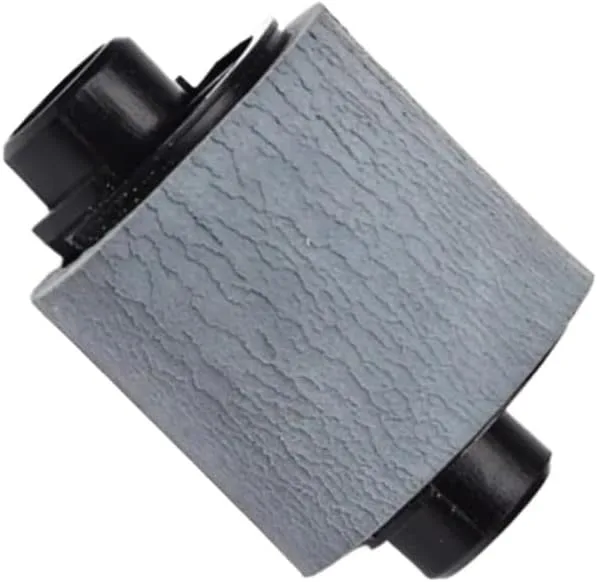
When evaluating a feed roller supplier, ask for samples and inspect them closely. Start with the surface: it should be uniform, free of pits, flash, or mold lines. Run your fingernail across the rubber—it should feel slightly tacky, not slick or brittle. Check the core: metal or plastic? Metal cores with precision bearings last longer, especially in high-volume machines. Plastic cores can crack under torque.
Measure the outer diameter and width with calipers. Even a 0.5 mm deviation can cause misalignment and premature wear. Also, verify the shaft length and any mounting features. For Xerox models, many rollers are model-specific; a roller for a WorkCentre 7855 won't fit a VersaLink C7020. Cross-reference part numbers: Xerox 059K59950, 022K73790, and 604K67480 are common, but aftermarket equivalents should be validated against your machine's serial number range.
Material and Construction: What Separates Long-Life Rollers
Long-life feed rollers typically use a dual-layer construction: a hard inner core for structural integrity and a softer outer layer for grip. The outer layer is often a high-performance rubber like EPDM, which resists hardening better than natural rubber. Some premium rollers add a conductive additive to dissipate static, which is critical in dry environments where static causes multi-feeds.
Another factor is the bearing. Sealed ball bearings reduce friction and prevent dust ingress, extending roller life. Cheaper rollers use bronze bushings that wear out faster. Ask your supplier about the bearing type and whether the roller is dynamically balanced. An unbalanced roller will vibrate, causing noise and uneven wear. For Xerox high-speed models, balance is non-negotiable.
Supplier Vetting: Factory-Direct vs. Trading Companies
Many aftermarket rollers are sourced through trading companies that repackage low-cost imports. These rollers often skip critical curing steps, leading to premature failure. A factory-direct supplier controls the entire process—from compound mixing to molding, curing, and testing. That means consistent quality and the ability to customize for specific Xerox models.
When vetting a supplier, ask for test data: abrasion resistance (DIN), compression set, and ozone resistance. A good supplier will provide these without hesitation. Also, check their OEM/ODM capabilities. Can they produce rollers with your branding? Can they reverse-engineer a discontinued Xerox roller? A factory with in-house tooling and R&D can do this quickly, while traders cannot.
Installation and Maintenance Tips for Maximum Life
Even the best roller can fail early if installed incorrectly. Clean the shaft and mounting points before installation. Avoid touching the rubber surface with bare hands—oils from your skin can degrade the compound. Use a lint-free cloth and isopropyl alcohol to clean the roller if needed. Check the separation pad and pick-up roller at the same time; a worn pad will cause jams even with a new feed roller.
Set the paper tray guides snugly but not too tight. Excessive pressure accelerates wear. In high-volume environments, schedule roller replacement based on page count, not just when jams occur. For Xerox machines, typical replacement intervals are 120,000 to 200,000 pages for standard rollers, but long-life versions can double that.
CLONER manufactures feed rollers for Xerox and other major brands at our own factory, using premium compounds and rigorous testing. We offer OEM/ODM services, so you can get rollers tailored to your specifications, with your branding, at factory-direct prices. Whether you need a standard replacement or a custom long-life solution, our team can help you reduce service calls and boost customer satisfaction. Contact us for samples and a quote.
Need a quote or samples from CLONER?
Factory-direct OEM/ODM supplier of compatible printer consumables & spare parts. Tell us your models — reply within 24h.