Fuser Assembly for Brother: Compatibility, Page Yield and Sourcing Tips
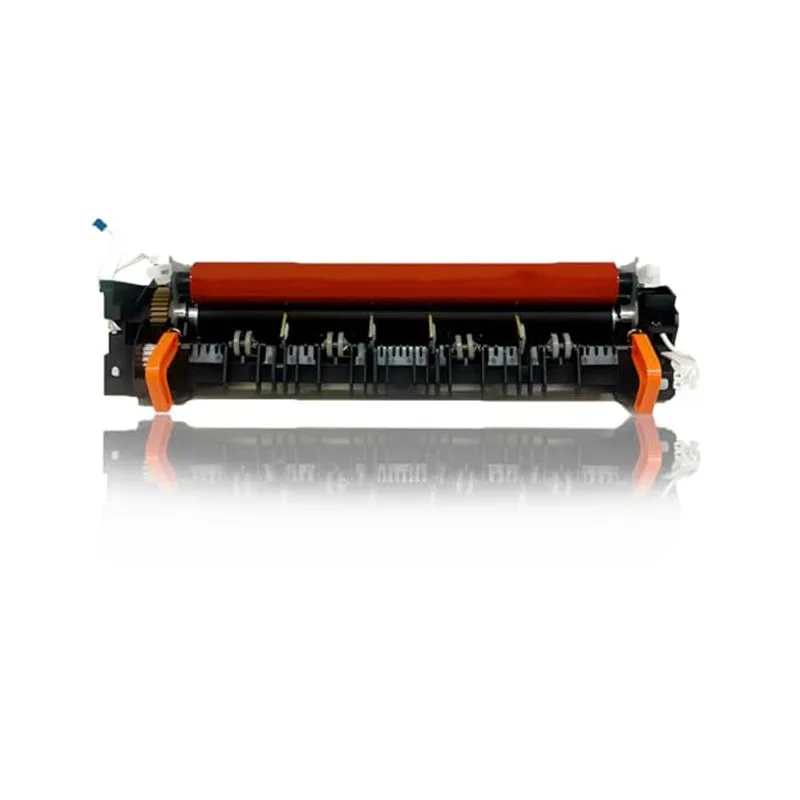
When a Brother laser printer starts throwing up 'Fuser Error' or leaving smudges that won't wipe off, the fuser assembly is usually the culprit. For B2B buyers, this part is a steady revenue stream—but only if you know which variants fit which machines and how to gauge quality before you commit to a container order. Here's the practical breakdown.
Compatibility: Not All Brother Fusers Are Created Equal
Brother has a habit of using similar-looking fusers across different model families, but subtle differences in connector pins, thermistor placement, and heater lamp wattage can cause immediate failure or intermittent errors. For example, the fuser for the HL-L2300 series (part number 940-0005) looks nearly identical to the one for the HL-L2350 series, but the latter uses a different thermistor curve. Install the wrong one and you'll get 'Fuser Error' after a few cold starts.
Always cross-reference the OEM part number against your target printer models. Common Brother fuser part numbers include 940-0005 (HL-L2300/2350/2380, DCP-L2500/2520, MFC-L2700/2701), 940-0007 (HL-L5000/5100/5200/5300, MFC-L5700/5750), and 940-0009 (HL-L6200/6250, MFC-L6800/6900). For older models like HL-5440 or MFC-8510, you're looking at 940-0003 or 940-0001. Don't rely on memory—keep a lookup table on your sales desk.
Page Yield: What's Realistic and How to Verify
Brother rates most fuser assemblies for 100,000 pages, but that number assumes 5% coverage and clean paper. In the field, heavy cardstock or recycled paper can cut that to 60,000 pages. For buyers, the key is not the rated yield but the consistency of the aftermarket part. A cheap fuser that dies at 30,000 pages will burn you on warranty claims and customer trust.
Ask your supplier for test data: how many pages at 5% coverage before the heat roller shows wear, and what's the failure mode—does it stop heating or just degrade print quality? CLONER tests every fuser batch on actual Brother printers, logging page counts and thermal cycling. That's the kind of data you should demand from any vendor.
Inspection Points Before You Order
When you receive samples, don't just check that it fits. Open the fuser and look at the heat roller surface—it should be smooth, with no scratches or discoloration. Check the pressure roller for flat spots; press your thumb against it—it should spring back. Inspect the thermistor and thermostat wires: they should be routed away from moving parts and secured with clips. A loose wire is a ticking time bomb.
Also, verify the connector pins align with the machine's harness. Count the pins and compare to the OEM spec. Some aftermarket fusers use a universal connector that works on multiple models, but that can cause poor contact and intermittent errors. Insist on model-specific connectors.
Sourcing Tips: Factory-Direct vs. Middlemen
Most fuser assemblies are made in China, but there's a world of difference between a factory that stamps out generic parts and one that engineers to OEM specs. When you source through a trading company, you often pay a 20-30% markup and have no control over quality inspection. Going factory-direct cuts that cost and gives you direct communication for custom branding or packaging.
CLONER is a manufacturer, not a trader. We produce fuser assemblies for Brother, HP, and Canon, with full OEM/ODM capability. That means you can get the fuser in your own box, with your own part number, and even customized thermal settings for your local paper conditions. For high-volume buyers, we offer tiered pricing based on annual quantities, and we can drop-ship to your customers if that's your model.
Making the Right Choice for Your Business
Before you place a bulk order, test at least three fuser assemblies from different production batches. Run them in a high-usage Brother printer for a week, tracking page counts and any error codes. A reliable fuser should not throw 'Fuser Error' even after 10,000 pages. Also, check the warranty terms—CLONER offers a 12-month warranty against defects, and we honor it without fuss.
If you're tired of playing roulette with fuser quality and want a supplier who answers the phone when you call, talk to CLONER. We'll send you samples, share our test data, and work out a pricing structure that makes sense for your market. That's the kind of partnership that keeps your customers happy and your margins healthy.
Need a quote or samples from CLONER?
Factory-direct OEM/ODM supplier of compatible printer consumables & spare parts. Tell us your models — reply within 24h.