How to Check OKI Drum Unit Quality Before You Buy: Insider Tips for B2B Buyers
Buying drum units for OKI copiers can be a gamble if you don't know what to look for. With so many suppliers pushing low-cost alternatives, quality varies wildly. A bad drum unit leads to streaky prints, premature failures, and unhappy customers. As a B2B buyer, you need to protect your margins and reputation. This guide gives you practical, insider methods to assess OKI drum unit quality before you commit to a purchase order.
Understand the OKI Drum Unit: Key Components and Failure Points
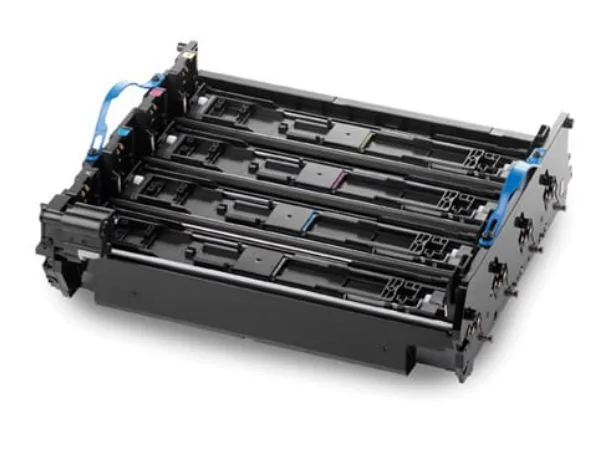
OKI drum units, used in models like the C300/C500 series, MC300/MC500, and C800/C900 series, are integrated assemblies that include the OPC drum, charge roller, cleaning blade, and sometimes the developer unit. The OPC drum is the heart—its coating quality determines image transfer and longevity. Cheap drums often have uneven coating or thin layers that wear out in a few thousand pages. The charge roller must maintain consistent resistance; if it's too soft or has impurities, you'll see background scatter or ghosting. The cleaning blade should be sharp and properly angled to remove residual toner without scratching the drum.
Common failure symptoms in subpar units include repetitive marks every 2-3 cm (drum circumference), gray background, and premature drum wear. Inspect these components physically when you receive samples. Run a test print on a known-good machine and check for uniformity. A quality drum unit should produce sharp text and solid fills without streaks from the first page.
Physical Inspection: What to Look and Feel For
When you get a sample drum unit, start with the packaging. Reputable manufacturers like CLONER use anti-static bags and shock-absorbing foam to prevent damage during transit. Check the drum surface under bright light—it should be smooth, free of scratches, and have a consistent green or blue tint. Any discoloration or cloudy spots indicate coating defects. The charge roller should be clean, with no visible seams or flat spots. Roll it between your fingers; it should feel firm but slightly compressible, not hard or mushy.
Look at the cleaning blade edge under magnification. A sharp, straight edge is crucial; nicks or unevenness cause streaks. Also, check the electrical contacts—they should be clean and springy. Corroded or loose contacts lead to poor charge and print quality issues. If you can, weigh the unit; genuine OKI drums are denser due to higher-quality materials. Lightweight units often skimp on metal components, leading to vibration and misalignment.
Performance Testing: Beyond the First Page
A drum unit that prints well initially might fail after a few hundred pages. Run a stress test: print a 50% coverage page continuously for 500 pages and monitor for degradation. Check the drum for wear patterns—uneven wear indicates poor coating or bad cleaning blade contact. Measure the drum's rotation torque; excessive resistance means bearing or blade issues. Also, test in different environmental conditions if possible. High humidity can cause backgrounding if the charge roller isn't properly formulated.
Compare yields. A quality OKI drum unit should meet or exceed OEM yield specifications—typically 20,000 to 30,000 pages for color models. If a supplier claims higher yields at a lower price, be skeptical. They may use thinner coatings that fail early. Ask for test reports from independent labs or request a sample run in your own environment. CLONER provides detailed test data and encourages buyers to validate performance before bulk orders.
Supplier Vetting: Separating Factories from Trading Companies
Many suppliers claim to be manufacturers, but they're just resellers. Ask for a factory audit report or a video tour. A real factory like CLONER will have automated production lines, clean rooms for drum coating, and rigorous QC processes. Check their certifications—ISO 9001 is a minimum. Look for OEM/ODM experience; if they supply major brands, their quality is likely reliable. Request references from other B2B customers in your region.
Pricing is another clue. If the price is significantly lower than market, it's probably a remanufactured or low-grade unit. Genuine new-build drum units from a factory-direct source offer the best balance of cost and quality. Negotiate with a manufacturer that controls the entire process, from coating to assembly. This eliminates middlemen and ensures consistency.
Ordering and After-Sales: Protecting Your Investment
Before placing a bulk order, clarify warranty terms. A reputable manufacturer offers at least a 12-month warranty or a page-yield guarantee. Get the defect rate in writing—top factories keep it under 1%. Order a small batch first to test consistency. Check the manufacturing date; drum units degrade on the shelf, so fresh stock is essential. Packaging should include desiccant to prevent moisture damage.
After-sales support matters. Can the supplier provide technical assistance or replacement parts quickly? CLONER offers responsive support and OEM/ODM services, including custom packaging and branding. For B2B buyers, this means you can build your own brand without sacrificing quality. Always request a pre-shipment sample and inspect it thoroughly before mass production.
CLONER manufactures OKI-compatible drum units in our own factory, with strict QC and OEM/ODM capabilities. We supply importers, wholesalers, and repair shops worldwide with reliable, cost-effective alternatives to OEM. Contact us for samples and see the difference factory-direct quality makes.
Need a quote or samples from CLONER?
Factory-direct OEM/ODM supplier of compatible printer consumables & spare parts. Tell us your models — reply within 24h.