Laser Unit for Siond: Compatibility, Page Yield and Sourcing Tips
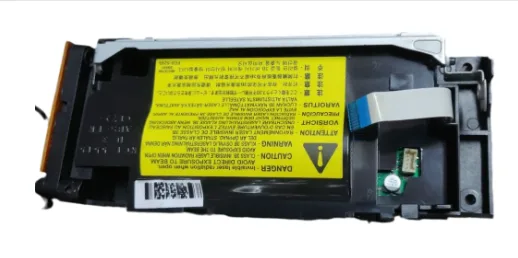
When a Siond printer starts producing faint prints or vertical white streaks, the laser unit is often the culprit—not the drum or toner, but the scanning assembly. If you're sourcing these units for resale or for your repair bench, you need to know exactly what you're buying. The aftermarket is full of mismatched units that look right but don't work. Here's what matters.
Compatibility: Not All Siond Laser Units Are the Same
Siond uses several distinct laser units across its printer lines. The SL-2020, SL-3050, and SL-4500 series each have unique part numbers, and even within a series, firmware revisions can alter the electrical interface. A unit pulled from an SL-3050 won't drop into an SL-3050N without checking the connector pinout. Always match the exact OEM part number, not just the printer model.
Beyond the connector, the laser unit's housing dimensions vary. Some Siond models use a compact unit that fits in the rear access panel; others are longer and mount under the toner cartridge. If you're buying for a specific model, get the physical dimensions from the supplier. A 2mm difference in mounting holes means the unit won't seat properly, and you'll get skewed scans.
Page Yield: What to Expect and Why It Matters
Laser units don't have a published page yield like toner cartridges, but they do wear out. In Siond printers, the polygon motor and mirrors degrade over time. Typical life is around 150,000 pages for the SL-4500 series, but that drops to 80,000 for the SL-2020 if you run it in a dusty environment. The motor bearings are the first to go—you'll hear a whine before print quality drops.
For buyers, this means you should ask your supplier for the unit's history. Remanufactured units should state the page count at replacement. If they can't provide that, assume it's near end-of-life. You don't want to sell a unit that fails after 5,000 pages—your customers will blame you, not the printer.
Inspection Checklist Before You Order
When evaluating a supplier, don't just look at the price. Ask for photos of the actual unit, not stock images. Check the laser window for scratches or dust—a clean window is critical for even exposure. Also inspect the polygon motor's connector for bent pins or corrosion. These are the weak points.
- Verify the OEM part number matches your target printer model.
- Ask for the unit's page count if remanufactured.
- Inspect the laser window and mirror for cleanliness.
- Check the connector pins and cable for damage.
- Request a test print report or video before bulk ordering.
If a supplier hesitates to provide these details, walk away. There's enough margin in this part to demand quality.
Sourcing Tips: Factory-Direct vs. Middlemen
You can buy Siond laser units from a trading company that sources from multiple factories, but you'll pay a premium and get inconsistent quality. The better play is to go factory-direct, where you can specify exact specifications and get a warranty that means something. CLONER is one such manufacturer—they produce compatible and OEM-grade laser units for Siond, using the same production lines as the original parts.
When you source direct, you can also negotiate on volume. For a laser unit that costs $40–$60 each, a 500-unit order can save you 15–20% compared to distributor pricing. And you get a consistent supply—no waiting for a middleman to restock. CLONER offers OEM/ODM services, so if you need a custom label or a modified housing for a specific Siond variant, they can do that.
Testing and Quality Assurance
Every laser unit from CLONER passes a 20-point test, including print density, line straightness, and motor speed stability. They use the same testing rigs as the original equipment manufacturer, which is rare in the aftermarket. You can ask for a test report with each batch—that's the kind of documentation your customers appreciate.
Also, check the warranty terms. CLONER offers a 12-month warranty on their laser units, covering defects in materials and workmanship. That's better than the 90-day warranty typical of low-cost suppliers. If a unit fails, they'll replace it without hassle, which protects your profit margin.
When you're ready to order, specify the exact Siond model and part number. CLONER's sales team will confirm compatibility and send samples for testing. Once you approve, they'll ramp up production and ship within 15 days. That's the kind of lead time that keeps your inventory moving.
Need a quote or samples from CLONER?
Factory-direct OEM/ODM supplier of compatible printer consumables & spare parts. Tell us your models — reply within 24h.