OEM Fuser Assembly for Konica Minolta: Aftermarket Copier Spares Buying Guide
Konica Minolta bizhub and C-series machines are workhorses, but their fuser assemblies are a frequent failure point. When you're sourcing aftermarket spares, the difference between a reliable OEM-equivalent fuser and a cheap knockoff shows up in jams, copy quality, and your reputation. This guide covers what to inspect, how to choose, and where factory-direct pricing fits in.
Why Fuser Assemblies Fail and What to Look For
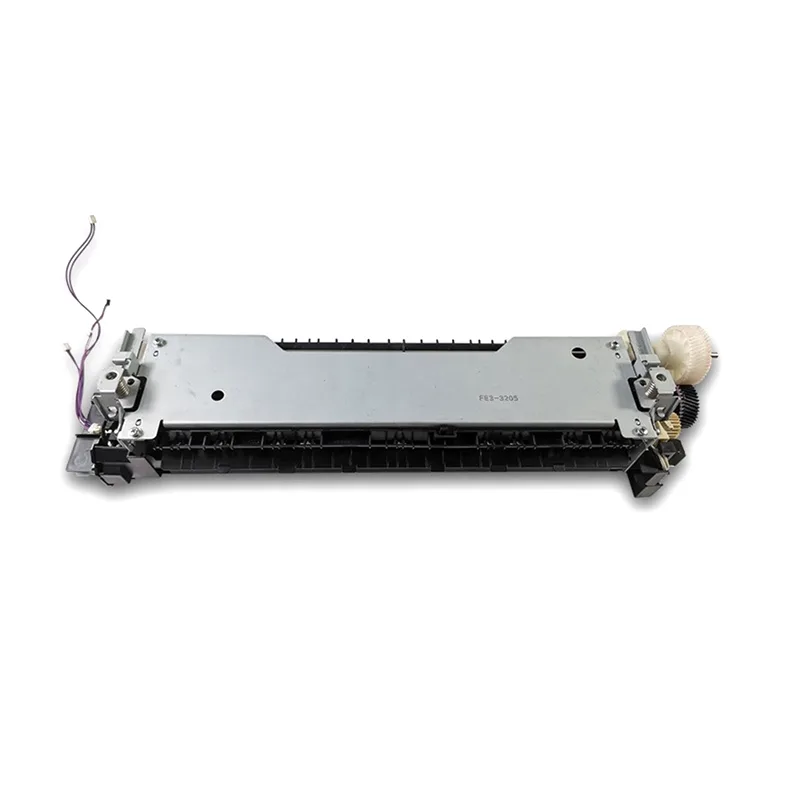
Fuser assemblies in Konica Minolta bizhub 223, 283, 363, 423, and 7828 series typically fail after 150k–300k prints. Symptoms include ghosting, offsetting, and error codes like C-2801 or C-2803. The OEM part numbers you'll see most: A1UD-R723, A1UD-R724, A1UD-R725. Aftermarket versions often skip critical details: inferior halogen lamps, thin fuser belts, or non-OEM thermistors that drift out of spec. When inspecting a fuser, check the pressure roller for flat spots and the fuser belt for edge wear. A genuine OEM assembly has a smooth, even coating; cheap ones show ripples or bubbles.
Heat rollers are another tell. OEM rollers use a specific ceramic coating that resists toner adhesion. Aftermarket rollers with lower-grade coatings will start offsetting within 50k prints. If you're buying for C224, C284, C364, or C454 series, pay attention to the fuser unit's gear train—brittle plastic gears are a common failure in low-cost alternatives.
Aftermarket vs. OEM: What Actually Matters
Price alone shouldn't drive your decision. A $60 fuser that fails at 80k prints costs more in service calls than a $120 unit that lasts 200k. Look for suppliers who provide test reports for lamp wattage, thermistor resistance, and belt thickness. OEM fusers for Konica Minolta typically use 800W–1000W lamps; aftermarket units with 600W lamps will cause fuser errors in high-speed modes. Also check the connector type—some aftermarket fusers ship with generic plugs that don't lock into the machine's harness, leading to intermittent errors.
For high-volume environments, consider rebuilt OEM fusers. These use original cores with new belts, rollers, and lamps. They're a middle ground: better than most aftermarket, cheaper than new OEM. But verify the rebuilder's warranty—at least 90 days or 50k prints. CLONER manufactures fuser assemblies from the ground up, not just rebuilt. We control the belt molding, lamp winding, and thermistor calibration in-house, so every unit meets OEM specs for temperature curve and pressure.
Inspection Checklist for Incoming Fuser Assemblies
When a shipment arrives, don't just stock it. Inspect a sample from each batch. Start with the fuser belt: it should be free of creases and have a uniform matte finish. Check the pressure roller for hardness—it should be firm but slightly compressible. Test the thermistor with a multimeter; resistance should match the service manual (typically 200–400 kΩ at room temperature). Spin the gears by hand; they should turn smoothly without binding. Finally, check the lamp for cracks or discoloration.
Packaging matters too. Fusers are fragile. If they arrive in thin bubble wrap with no foam support, the belt may be deformed. CLONER ships each fuser in a custom-molded foam tray inside a reinforced box, so they arrive ready to install.
- Verify part number matches the machine series (e.g., A1UD-R723 for bizhub 223/283).
- Inspect belt for creases, bubbles, or edge wear.
- Test thermistor resistance and lamp continuity.
- Check gear teeth for cracks or missing teeth.
- Confirm connector type matches OEM harness.
Ordering and Compatibility: Avoid Common Mistakes
Konica Minolta fusers are not universal. A fuser for a bizhub 363 won't fit a 423, even though they look similar. Always cross-reference the machine's model and serial number. Some aftermarket suppliers list a fuser as compatible with multiple models, but the pressure springs or mounting brackets differ. If you're buying for a mixed fleet, order by exact model. Also, check the voltage—110V vs. 220V fusers are not interchangeable. If you're an importer, specify the voltage for your region.
Another trap: firmware. Newer Konica Minolta machines may reject non-OEM fusers if the thermistor's resistance curve doesn't match the firmware's expected values. This triggers a C-2801 error. Ask your supplier for a compatibility list or a test report showing the fuser works with the latest firmware. CLONER provides firmware compatibility testing for all our fuser assemblies, so you won't get returns from techs who can't clear the error.
Factory-Direct Sourcing: Cutting Out the Middleman
Most aftermarket fusers pass through two or three distributors before reaching you. Each adds markup and delays. Buying factory-direct from a manufacturer like CLONER means you get consistent quality control and better pricing. We produce fuser assemblies for Konica Minolta and other major brands, and we offer OEM/ODM services—if you need your own brand on the box, we can do that. Our MOQs are flexible, and we ship worldwide from our factory.
For wholesalers and repair shops, the math is simple: a factory-direct fuser that lasts 200k prints at 30% less than OEM keeps your customers happy and your margins healthy. We stand behind every unit with a 12-month warranty and technical support. If you're tired of inconsistent aftermarket fusers, request a sample and see the difference for yourself.
Need a quote or samples from CLONER?
Factory-direct OEM/ODM supplier of compatible printer consumables & spare parts. Tell us your models — reply within 24h.