How to Check Printer Cable Quality for Kyocera Copiers Before You Buy
Kyocera copiers like the TASKalfa series are workhorses, but a cheap printer cable can cause intermittent errors, data corruption, or even mainboard damage. Most buyers only notice the cable when the machine throws a C-code or jams mid-job. Before you commit to a container load, you need to know how to separate a robust cable from a reject. This guide gives you the exact checks we use on our factory floor.
Connector Quality: The First Failure Point
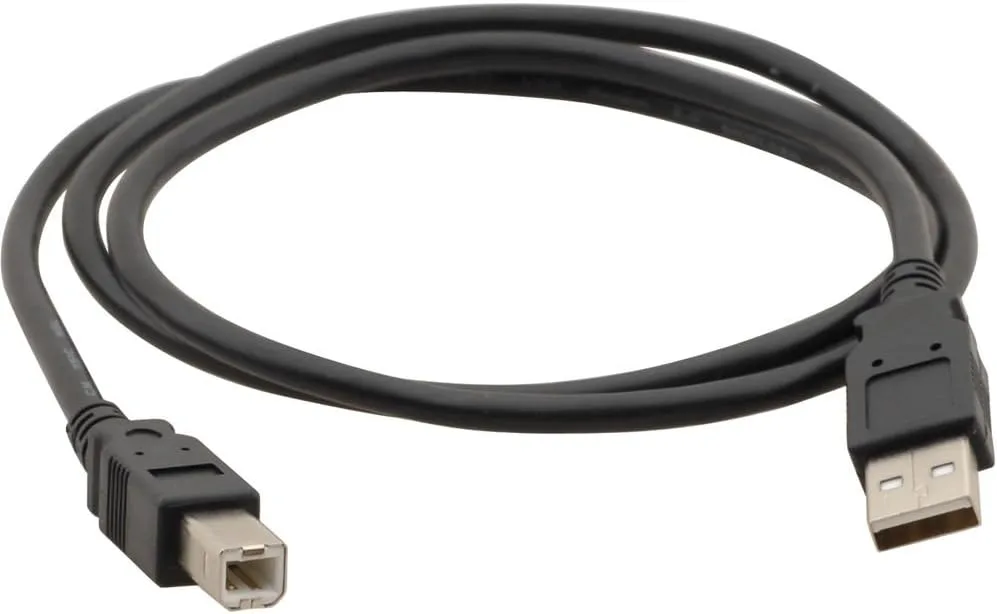
The connector on a Kyocera printer cable is where most failures start. Genuine Kyocera cables use a high-density plastic housing with a metal shield that snaps firmly into the copier's port. Cheap alternatives often have thin, brittle plastic that cracks after a few insertions. Run your thumbnail along the connector edge—if it feels sharp or uneven, the mold is worn. A quality connector has a smooth, uniform finish and no flash (excess plastic).
Look at the pins inside. They should be gold-plated, not just gold-colored. Gold plating resists oxidation and maintains signal integrity over thousands of cycles. If the pins look silver or brass, they're likely tin-plated, which corrodes in humid environments. We've seen cables from unknown suppliers where the plating rubs off after 50 insertions, causing random disconnects. For Kyocera models like the TASKalfa 2553ci or 3252ci, a loose connector can trigger false paper jam errors that waste hours of technician time.
Check the strain relief where the cable meets the connector. A proper design has a molded boot that flexes without exposing inner wires. Tug gently—if the cable slides out of the connector, the crimp is weak. In our OEM/ODM production, we pull-test every batch to 5 kgf to ensure the connector holds.
Shielding and Signal Integrity
Kyocera copiers transmit high-speed data between the mainboard and the print engine. Without proper shielding, electromagnetic interference (EMI) from motors or power supplies can corrupt signals. Look for a foil or braided shield under the outer jacket. Cut a sample cable lengthwise—if you see only two or three wires with no shield, walk away. A quality cable has at least 85% braided coverage or an aluminum foil wrap with a drain wire.
The shield must be terminated to the connector shell, not just floating. A floating shield acts as an antenna, making EMI worse. In our factory, we crimp the drain wire to the metal backshell and verify continuity with a multimeter. For Kyocera models with duplex units or finishers, the cable runs near high-voltage components, so shielding is non-negotiable. We've tested cables without proper grounding and seen bit-error rates spike by 40%, leading to garbled print jobs.
Also check the outer jacket material. PVC is common, but for industrial environments, a thermoplastic elastomer (TPE) jacket resists oil and abrasion better. If the jacket feels slick and thin, it may crack in cold warehouses. A simple bend test—flex the cable 180 degrees—should not leave a permanent kink.
Conductor Gauge and Length Matters
Copper is expensive, so some suppliers cut corners by using thinner conductors or copper-clad aluminum (CCA). CCA has higher resistance and breaks easily. Strip back the jacket and count the strands. For a Kyocera printer cable, you want 28 AWG or thicker for data lines and 24 AWG for power. If the wire feels stiff and springy, it's likely CCA. Real copper is softer and bends smoothly.
Length affects voltage drop. A 3-meter cable with 28 AWG may work, but a 5-meter version of the same gauge can cause intermittent errors. Stick to the length specified in Kyocera's service manual—usually 1.5 to 3 meters. Longer cables need thicker conductors to compensate. We stock both OEM-standard lengths and custom lengths for integrators, and we always test signal eye diagrams to ensure compliance.
Don't overlook the connector orientation. Kyocera uses keyed connectors to prevent reverse insertion. A cheap cable might have a generic key that fits loosely, allowing misalignment. Check that the key matches the copier's socket exactly. We keep a library of Kyocera connector molds to guarantee a snap-fit.
Certifications and Supplier Vetting
UL, CE, and RoHS marks are a start, but they don't guarantee performance. Ask for the test report—not just the certificate. A reputable supplier will provide insertion loss, crosstalk, and impedance data. We test every reel for impedance (should be 100 ohms ±10% for twisted pairs) and time domain reflectometry (TDR) to catch impedance mismatches.
Request a sample and run your own tests. Plug it into a Kyocera copier and run a 1000-page duplex job. Monitor for errors. Then flex the cable during operation—if the job fails, the cable is defective. We encourage buyers to do this; it's how we qualified our own suppliers. For OEM/ODM orders, we can customize the connector, length, and shielding to your exact specs, and we provide full traceability from raw copper to finished cable.
Finally, check the supplier's factory. A clean, organized production line with automated crimping and testing equipment is a good sign. Hand-soldered connectors are a red flag. Our factory uses fully automated lines with in-line electrical testing, so every cable is verified before packing.
Ordering from CLONER: Factory-Direct Advantage
CLONER manufactures printer cables for Kyocera copiers in our own facility, so you avoid middleman markups and inconsistent quality. We offer OEM/ODM services—send us your specifications or a sample, and we'll produce cables that match or exceed the original. Our engineers are familiar with Kyocera's connector pinouts and shielding requirements, and we keep stock of common models like the TASKalfa 2553ci, 3252ci, and 4053ci. Whether you need a few hundred or a full container, we deliver consistent quality with test reports. Contact us for a sample kit and see the difference for yourself.
Need a quote or samples from CLONER?
Factory-direct OEM/ODM supplier of compatible printer consumables & spare parts. Tell us your models — reply within 24h.