Pickup Roller for OKI: Compatibility, Page Yield and Sourcing Tips
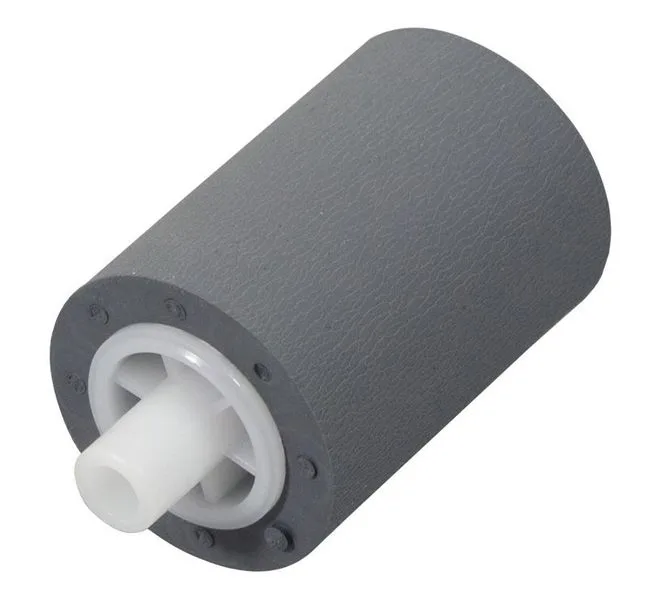
If you're stocking pickup rollers for OKI printers, you know the frustration of a roller that fails after a few thousand pages, causing paper jams and customer callbacks. The OKI B400, B410, B430, C301, C310, C510, C530, C610, C710, and C910 series all rely on these small rubber parts, and they wear out faster than you'd think. Here's what you need to know to buy right the first time.
Why Pickup Rollers Fail and What to Look For
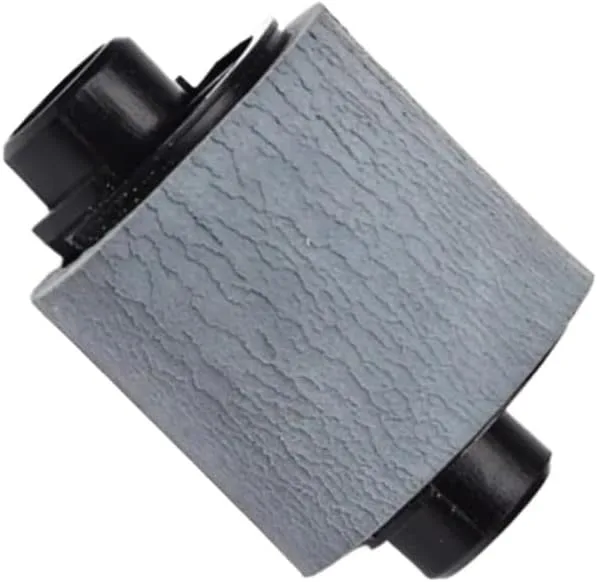
OKI pickup rollers are typically made of EPDM rubber, which is chosen for its resistance to heat and ozone, but even EPDM degrades over time. The first sign of trouble is usually a paper jam at the tray, or the printer reporting a 'pickup failure' error. If you see flat spots or glazing on the roller surface, that's a clear indicator of wear. When inspecting a new roller, check the surface for a consistent matte finish—glossy spots mean it's been polished or is low-grade. Also, measure the roller's diameter; a new OKI roller should be around 20mm, and if it's less than 19mm, it's likely a reject or used part.
Another common issue is the roller's hardness. OEM rollers are typically 45-50 Shore A, which gives the right grip without being too stiff. Cheaper aftermarket rollers might be harder, causing them to skip on glossy paper or wear out the separation pad faster. You can test this by pressing your fingernail into the rubber—it should leave a slight indentation that springs back. If it doesn't, the roller is too hard.
Compatibility Across OKI Models
Many OKI models share the same pickup roller part number. For instance, the B400 and B410 use the same roller, as do the C301 and C310. But don't assume—always cross-reference the part number. The OKI part number is usually printed on the roller shaft or in the service manual. For the B-series, it's often 44069101, while the C-series uses 44069102 or 44069103, depending on the tray design. If you're sourcing for multiple models, it's worth stocking a universal roller that fits both, but verify the shaft length and gear alignment. Some rollers have a D-shaped shaft, others have a keyway, and getting it wrong means you can't install it.
One pitfall: some suppliers sell 'compatible' rollers that actually fit only the tray 1, not the optional tray 2. The tray 2 roller is often a different part because the tray is deeper. Check the length—tray 1 rollers are around 20mm, tray 2 rollers are 25mm. If you're not sure, ask the supplier for the exact dimensions and compare with your sample.
Page Yield and When to Replace
OEM OKI pickup rollers are rated for about 100,000 pages, but in real-world use, they often last 60,000-80,000 pages depending on paper quality and duty cycle. A good aftermarket roller should meet or exceed that. The key is the rubber compound—some aftermarket rollers use cheap SBR that hardens quickly, cutting life to 20,000 pages. Look for rollers that specify 'EPDM' or 'NBR' in the material. NBR (nitrile) is also fine, but EPDM is preferred for heat resistance.
You can extend roller life by cleaning them with isopropyl alcohol every 20,000 pages, but that's a service tip for your customers. For your inventory, you should track how many rollers you sell per printer model and compare that to the expected yield. If you see a spike in replacements for a particular batch, test that batch for hardness and surface quality. That's how you catch a bad supplier early.
Sourcing Direct from the Factory
When you buy from a manufacturer like CLONER, you get more than just a part—you get control over quality. We produce pickup rollers for OKI and many other brands in our own facility, using the same specifications as OEM. That means we can offer you OEM-ODM service: if you want your brand on the roller, or even a custom roller for a specialty printer, we can do it. Direct sourcing also means better pricing—you're cutting out the middleman, which is crucial when you're competing on margin.
Before placing a bulk order, ask for samples and test them in a high-volume machine. Run 10,000 pages and measure the wear. Also, check the packaging—rollers should be individually wrapped to prevent dust and ozone exposure, which can cause premature cracking. At CLONER, we package each roller in a sealed bag, and we provide a certificate of analysis with every batch, so you know the hardness and dimensions are within spec.
Ordering and Logistics Tips
When ordering pickup rollers, consider your lead time. If you're sourcing from Asia, typical lead time is 2-4 weeks for stock items, but custom orders might take 6 weeks. Plan your inventory accordingly. Also, think about minimum order quantities—some factories require 500 pieces, but at CLONER we offer flexible MOQs, starting at 100 pieces for standard rollers. That's helpful if you're testing a new market or have slow-moving models.
Finally, always request the technical datasheet and compare it with the OEM part. Look for the coefficient of friction (should be around 1.2-1.5), tensile strength (at least 10 MPa), and elongation at break (over 300%). These numbers tell you if the rubber will hold up. If a supplier can't provide these, that's a red flag. At CLONER, we share our datasheets openly, and our engineers are available to answer your technical questions via email or video call. That's the kind of partnership that keeps your customers happy and your reorder rates high.
Need a quote or samples from CLONER?
Factory-direct OEM/ODM supplier of compatible printer consumables & spare parts. Tell us your models — reply within 24h.