How to Check Konica Minolta Drum Chip Quality Before You Buy: A Buyer’s Checklist
You’ve probably seen it: a batch of drum chips that meters fine on the bench but throws a “toner cartridge not detected” error on a bizhub C368 after 50 copies. Or worse, chips that work in the first shipment and fail in the second. For importers and repair shops, the cost isn’t just the chip—it’s the service call, the return shipping, and the hit to your reputation. Here’s how to separate the good from the garbage before you wire payment.
Check the physical build: contacts, PCB, and potting
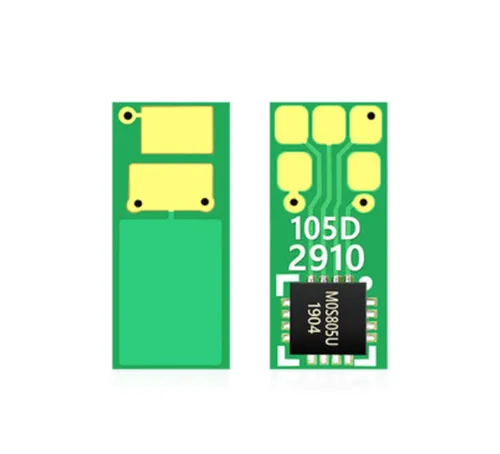
Start with the contact pads. A quality drum chip uses gold-plated or thick nickel contacts that sit flush and don’t wobble under finger pressure. Cheap chips often have thin tin plating that oxidizes in humid warehouses—common with shipments from coastal China. Look at the PCB edge: sharp, clean routing and no leftover flux. If the chip is potted (filled with epoxy), the fill should be even and fully cured; soft or sticky potting means the batch was rushed.
For Konica Minolta models like the bizhub C224e, C284e, C364e, and the newer i-series, the chip sits in a tight recess. A few tenths of a millimeter in PCB thickness can cause intermittent contact. Ask your supplier for the exact board thickness and compare with an OEM chip. If they can’t tell you, walk away.
Verify firmware compatibility and metering behavior
Drum chips aren’t just memory—they handshake with the copier’s firmware. A common failure is a chip that reads “new drum” but doesn’t reset the counter, or one that triggers a “waste toner full” error because the data string is wrong. Test a sample on the actual machine models you service. For Konica Minolta, pay attention to the difference between the C227/C287 series and the C300i/C360i series—the firmware protocols changed, and chips that work on one often fail on the other.
Ask the supplier for the firmware version the chip was tested against. Reputable factories keep a test log per batch. If they only say “compatible with all Konica Minolta,” that’s a red flag. Also check the metering: a good chip should report drum life remaining accurately, not jump from 100% to 5% after 200 prints.
Test batch consistency, not just the sample
One good sample means nothing. Order a small trial batch from three different production lots if possible. Run at least 20 chips from each lot on a mix of machines—low-mileage and high-mileage units. Watch for chips that fail after a few power cycles or after the copier goes into sleep mode. Inconsistent behavior across lots usually points to counterfeit microcontrollers or recycled chips that were re-flashed.
Recycled chips are a growing problem. They look new but have been pulled from used drums and re-labeled. A simple check: the contact pads on recycled chips often show micro-scratches under a magnifier. Also, the chip’s internal serial number may not match the batch code on the packaging. Ask your supplier if they use new wafers or recycled dies—and get it in writing.
Confirm supplier credentials and OEM/ODM capability
Price per chip is only half the story. A supplier who can’t provide a consistent firmware version or who disappears after the first order will cost you more in the long run. Look for a factory that runs its own SMT line and firmware flashing station—not a trading company that outsources. Ask for the yield rate on their last 10,000 chips. Anything below 98% is a warning sign.
If you need custom packaging, your logo on the chip, or a specific firmware variant for a regional market, confirm the supplier’s OEM/ODM experience. A real factory will ask for your machine models, firmware version, and expected monthly volume before quoting. They’ll also provide a test report with each shipment.
Incoming inspection: what to check when the box arrives
Don’t wait until a customer complains. Set up a simple incoming QC routine. Here’s a practical checklist:
- Pull 10 chips per lot and inspect contacts under a 10x loupe for plating thickness and scratches.
- Test 5 chips on each target machine model; run 100 copies and check for error codes.
- Verify the batch code on the chip matches the packaging and the test report.
- Check firmware version with a chip reader if you have one; compare against the supplier’s spec.
- Record failure rates per lot and share with the supplier—good factories want this data.
Keep a log of which lots fail and on which machines. Patterns emerge fast: a batch that fails only on the C368 but works on the C308 often has a firmware mismatch, not a hardware defect.
CLONER manufactures drum chips for Konica Minolta and other major brands at our own factory, with full firmware testing on the actual machine series. We supply direct to importers and repair shops, and we do OEM/ODM—your logo, your packaging, your firmware spec. If you’re tired of batch-to-batch surprises, ask us for a trial order with a lot-specific test report. We’ll show you the yield data before you commit.