How to Check Konica Minolta Drum Chip Quality Before You Buy
Most drum chip complaints don't start at the copier — they start at the purchase order. A Konica Minolta drum chip that reads correctly on the bench can still throw a "drum unit life" warning at 30% or fail to reset after a PM cycle, and by then the container is on a ship. The checks below are the ones repair shops and importers use to reject bad lots before payment, written for the C224/C284/C364, C258/C368, and the bizhub PRO and C6500/C7000 press families where drum chip failures get expensive fast.
Confirm the chip matches the drum unit, not just the model number
Konica Minolta drum chips are tied to a specific drum unit and machine series, and the mapping is narrower than most catalogues suggest. A chip sold as "C224 compatible" may program the IU life counter for the black drum only, while the colour drums use a different data set. Before you buy, ask the supplier to state the exact drum unit part number the chip is programmed for — for example the DR-512 family versus the DR-711 on the larger C series — and whether the firmware version matters. Konica Minolta changed counter behaviour across firmware releases on several C-series machines, and a chip written for early firmware can fail to clear on units updated to later versions.
Good suppliers will tell you which firmware ranges they have tested. Vague answers like "works on all Konica Minolta" are a red flag. Request the test matrix: machine model, firmware level, drum unit, and the resulting counter reading after install. If they can't produce it, you're buying a guess.
Inspect the physical chip: PCB, contact plating, and potting
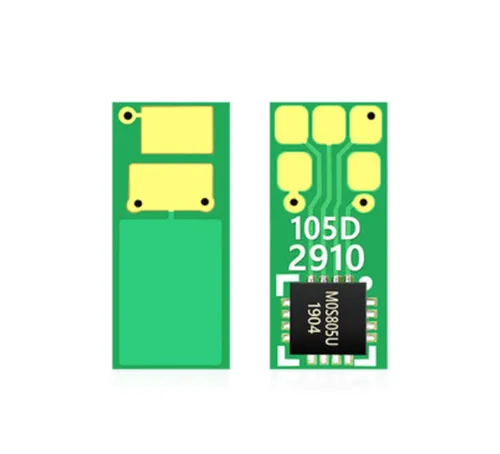
The chip itself is a small PCB with a contact pad array, and the cheap ones give themselves away in the hand. Look at the gold or tin plating on the contacts — it should be even, with no dark patches or visible copper through the finish. Thin plating oxidises in humid warehouses and causes intermittent "drum unit not detected" errors that customers will blame on your drum, not the chip.
Check the PCB thickness and rigidity. Flexible, wafer-thin boards flex when the drum unit is inserted and lose contact pressure over time. On OEM-grade chips the contact pad geometry is stamped or etched cleanly; on repackaged stock you'll often see misaligned pads, excess solder flux residue, or a conformal coating that stops short of the contact edge. If you can, open one chip per lot and compare it side by side with a known-good OEM chip under a loupe. The difference in pad alignment is usually obvious within seconds.
Test counter behaviour and reset logic, not just detection
Detection is the easy part. The real test is what the chip does to the drum life counter and the machine's PM cycle. Install a sample chip on a drum unit with known remaining life, run the machine through its drum replacement procedure, and watch the counter. A quality chip resets the life counter to the correct starting value for that drum unit and holds it — no drift, no premature "replace drum" warnings at 20–40%.
Run at least three cycles on the same chip if it's a re-writable type, and check whether the counter writes persist after a power cycle. Some low-grade chips lose their data when the machine is unplugged overnight. Also watch for error codes logged during the reset — a clean reset should leave no drum-related fault history. If your test bench has a C368 and a C258, test on both; cross-model behaviour separates properly programmed chips from single-model clones.
Audit the supplier: packaging, traceability, and lot consistency
Ask how the chips are packed. Factory-direct stock ships in anti-static tubes or trays with lot markings; repackaged chips often arrive in plain bags with no batch code. Batch traceability matters because a bad wafer run affects an entire lot, and you want to know which lot to quarantine if field returns spike.
- Request the lot or date code on the packaging and confirm it matches the invoice.
- Ask for the failure rate from the last three shipments, not a generic "99% good" claim.
- Confirm whether chips are programmed in-house or bought pre-programmed from a third party.
- Check the warranty terms — replacement only, or replacement plus freight on confirmed defects.
Consistency across lots is the tell. Order a small sample, then a second sample six weeks later, and compare counter behaviour. Suppliers who program in-house hold their data set stable; traders who source from whoever is cheapest will drift.
Why factory-direct programming changes the risk profile
CLONER manufactures and programs Konica Minolta drum chips in-house, which means the data set, PCB spec, and plating are controlled at the source rather than bought on the spot market. For importers and distributors, that translates into OEM/ODM options: your own labelling, your own packaging, and chip programming matched to the specific drum unit and firmware range you sell into. We can supply the test matrix for the models you stock and quote on volume with lot traceability built in.
Send us the model list and firmware versions you're servicing, and we'll confirm which drum chip variant fits and run a sample lot against them before you commit to a container. That's a faster route to a clean field record than sorting through repackaged stock after the fact.
Need a quote or samples from CLONER?
Factory-direct OEM/ODM supplier of compatible printer consumables & spare parts. Tell us your models — reply within 24h.